

Superseded on 04/11/2026. The maintained plan is AI Assistant Integration
(Development Guide). It keys the bot on the Laravel training id instead of the slug, has the super
admin generate the application key and the signing secret from the dashboard, adds daily quotas, and
carries mermaid flow diagrams. This page stays as the history of the 14/10 version.
LMS_Project/AI_ASSISTANT_INTEGRATION.md (written 14/10/2026). Repos touched: LMS_Backend →
LMS_Documentation → LMS_ai_bot → LMS_Frontend (in that order). All paths below are relative to each repo root.
Status: PLAN ONLY. Nothing below is implemented yet.Goal: the course-player assistant answers from each training’s uploaded Markdown, and only students
who own the training can use it.
- Key in the bot: the training slug. The bot’s
training_idbecomes the Laraveltrainings.slug. - Knowledge feeding: unchanged. You keep uploading
.mdfiles per training in the bot’s admin UI.
Security specifics are not mirrored here. Section 4 (Phase 0) of the workspace plan lists security
fixes that must land before the new endpoints go live. This site is public, so those details stay in
LMS_Project/AI_ASSISTANT_INTEGRATION.md and will be added here once they are fixed.Table of contents
- TL;DR
- What exists today
- Target architecture
- Design decisions and why
- Phase 0: prerequisites
- Phase 1: backend (Laravel)
- Phase 2: AI bot (FastAPI)
- Phase 3: frontend (Flutter)
- Phase 4: streaming and polish
- Environment variables checklist
- End-to-end acceptance checklist
- Decisions to confirm
- Suggested order of work
0. TL;DR
- Laravel mints a short-lived “AI access token” per training. A student calls
POST /api/ai-assistant/trainings/{slug}/token. Laravel checks that the student owns that training (paid order, not revoked) and returns a JWT signed with a secret it shares with the bot. The token carriessub(user id) andtrn(the slug) and lasts 30 minutes. - The bot verifies that token and enforces the slug. Every chat route checks
token.trn == conversation.training_id. Without a valid token for that exact slug, the request gets a 403. The bot never sees the student’s Sanctum token and never calls Laravel during a chat. - The bot fetches the training catalog from Laravel with a service key.
GET /api/ai-bot/trainingsis protected by anX-AI-Bot-Keyheader (a second shared secret, used server-to-server only). The bot’s admin UI uses it to replace the free-text “Training ID” box with a searchable training dropdown (slug + label + company). - Flutter talks to the bot directly with the AI token, using a separate Dio instance. Laravel
returns the bot’s base URL with the token, so there is no new per-environment constant to edit.
v1 uses the blocking
/messagesendpoint. Streaming comes in phase 4. - There are two secrets, and they are different values:
AI_BOT_JWT_SECRET: Laravel signs student tokens, the bot verifies them.AI_BOT_SERVICE_KEY: the bot calls Laravel’s catalog endpoints with it.
1. What exists today
Verified by reading the code of each repo.- LMS_ai_bot
- LMS_Backend
- LMS_Frontend
2. Target architecture
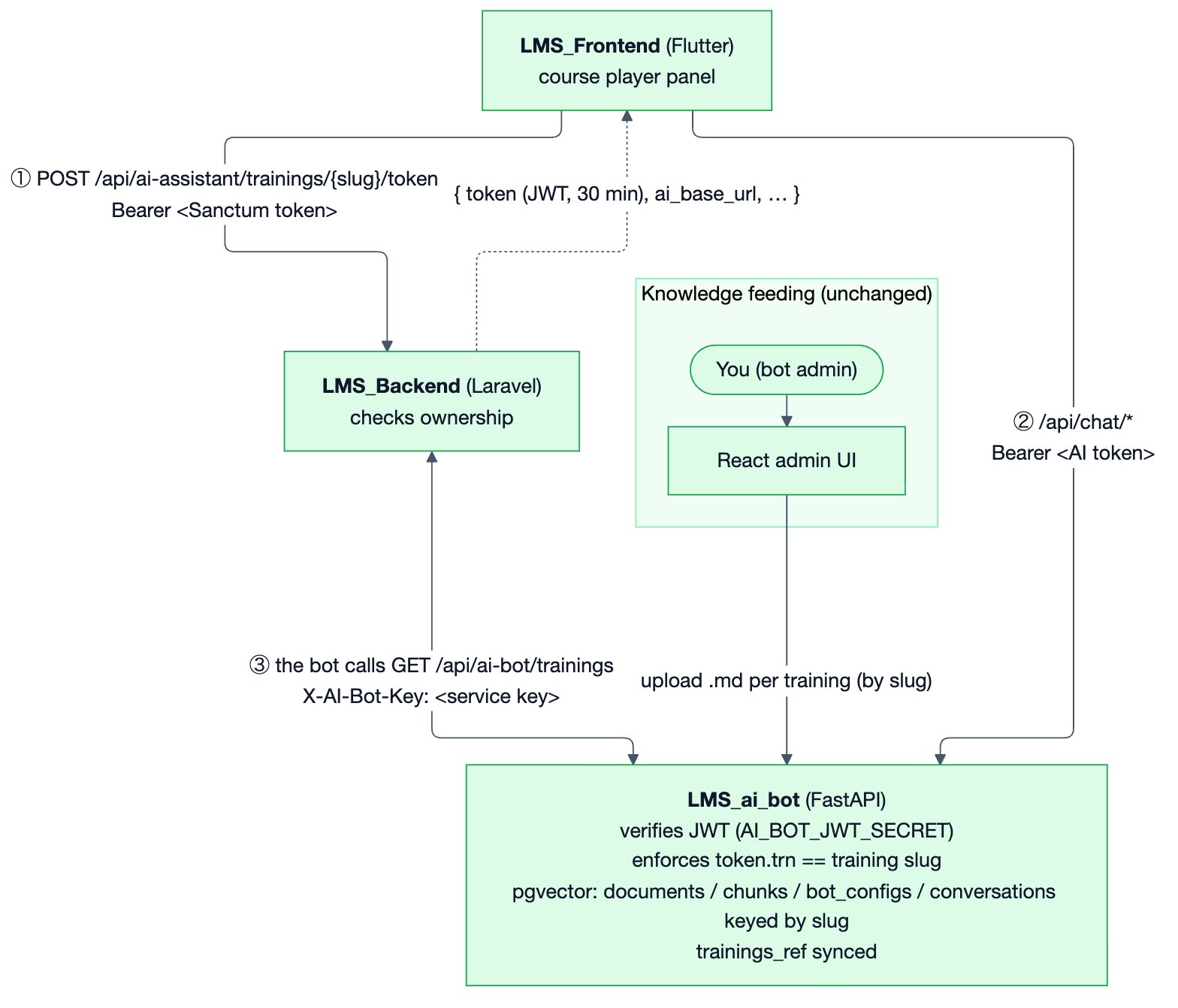
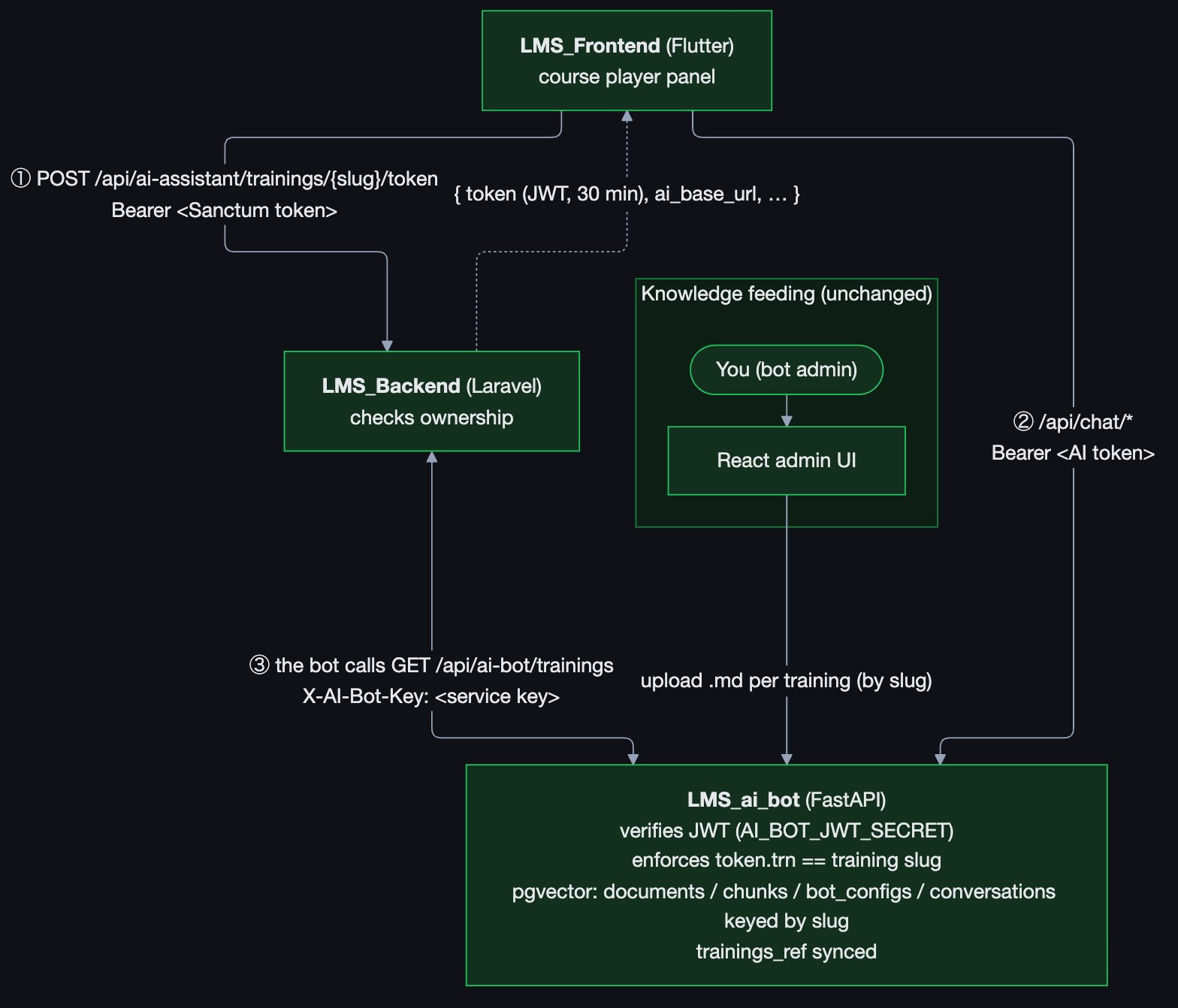
① Flutter gets a 30-minute AI token from Laravel · ② Flutter calls the bot with that token · ③ the bot pulls the training catalog from Laravel with its service key
Mermaid source
Mermaid source
Mermaid
Flow ①②: a student asks a question
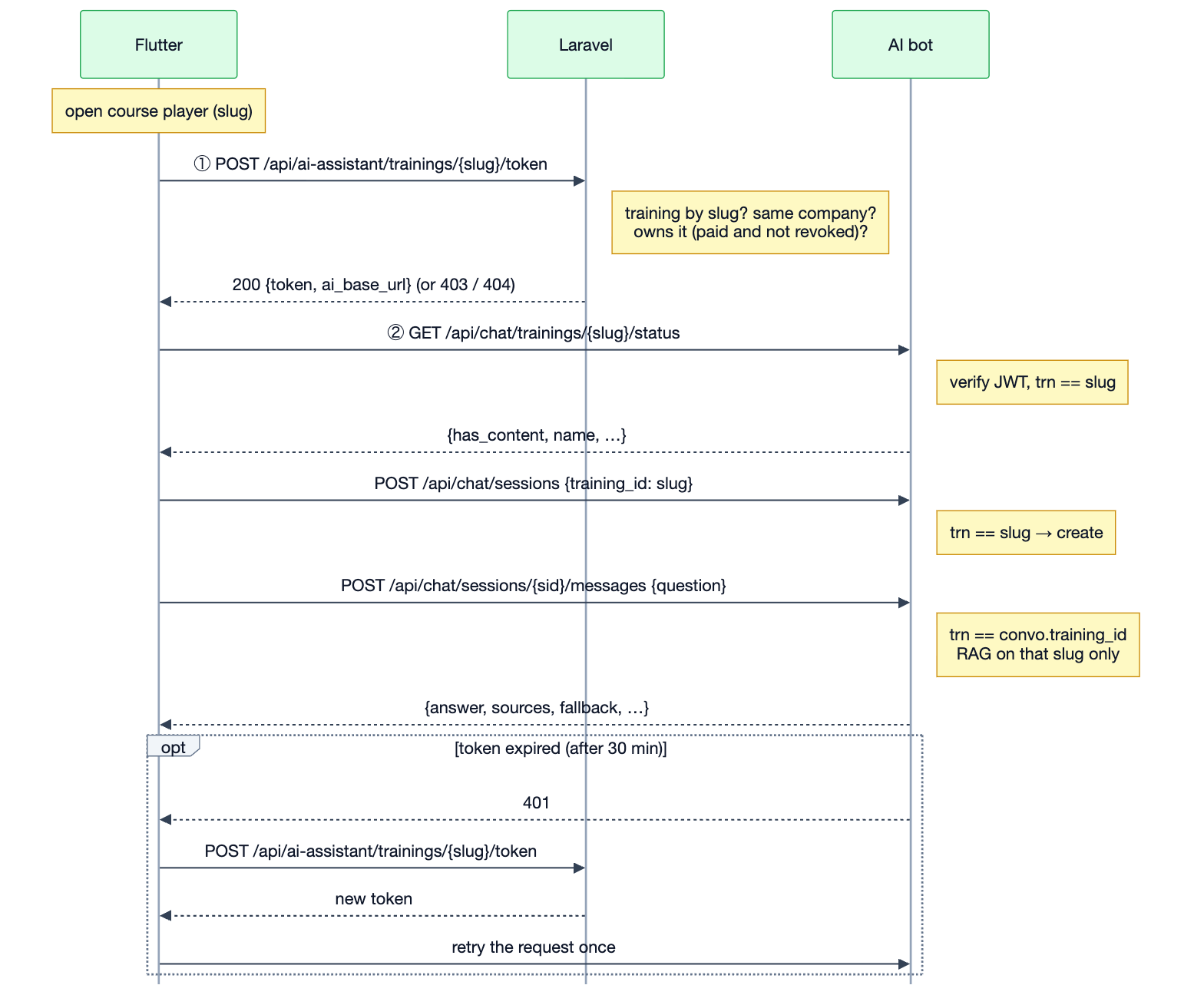
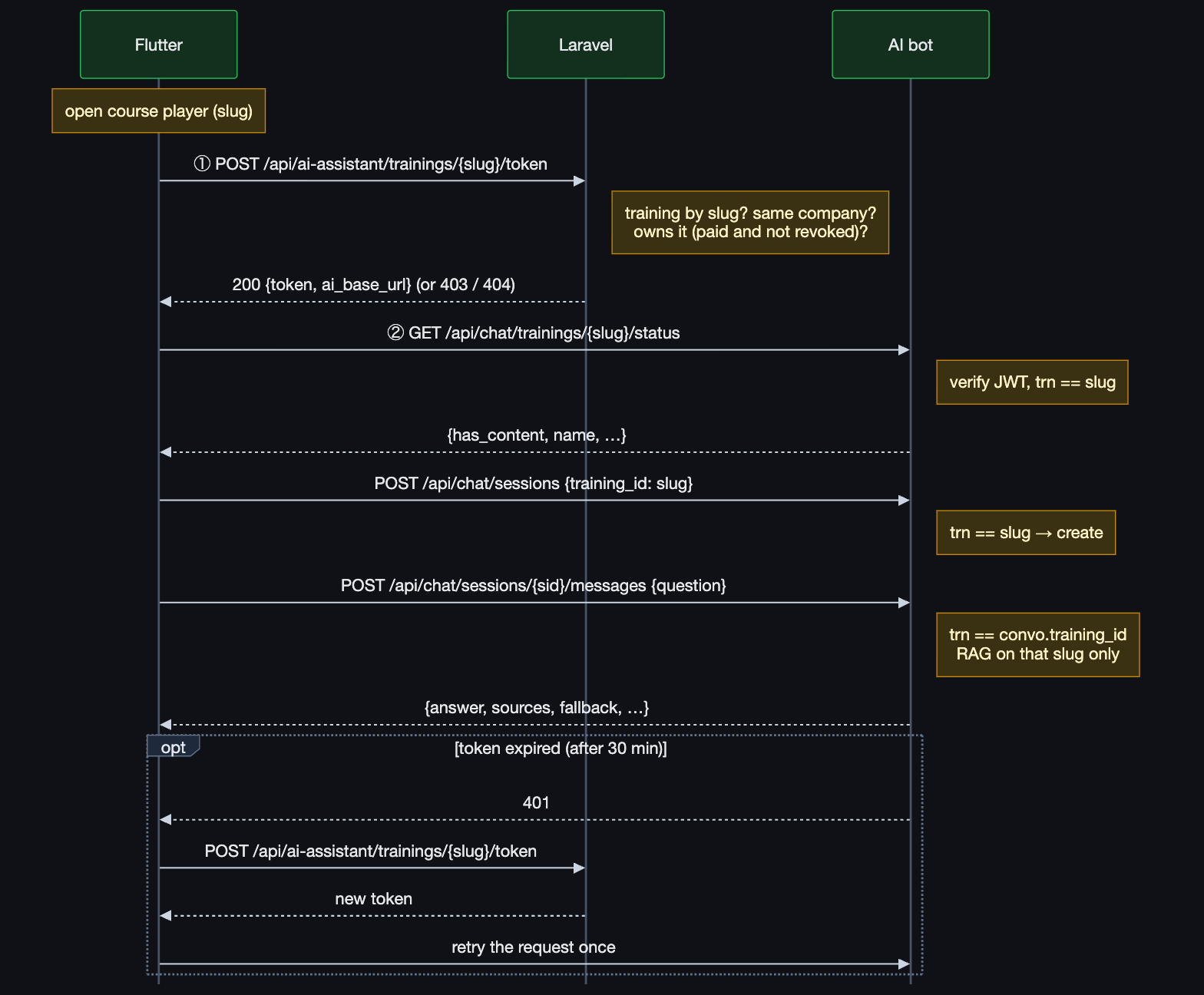
After 30 minutes the bot returns 401: Flutter fetches a new token from Laravel and retries once
Mermaid source
Mermaid source
Mermaid
Revocation: when an admin revokes access or refunds an order, Laravel stops issuing new tokens at
once. A token that was already issued keeps working until it expires (30 minutes at most). To cut that
window, lower
AI_BOT_JWT_TTL_MINUTES.3. Design decisions and why
3.1 The bot’s training_id is the Laravel slug
This works because slugs are unique across the whole platform, so no company prefix is needed. Four
caveats need handling:
3.2 Auth: a Laravel-minted, short-lived, per-training JWT
Per-training, not one token listing all trainings: the assistant only exists inside a training’s
course player, so one token = one slug is the smallest privilege. It also keeps the token small, and
the bot’s check is a single comparison.
3.3 Two separate secrets
Generate each with
openssl rand -hex 32. Use different values per environment (dev, test, prod).
The bot’s own JWT_SECRET (admin login sessions) must be a third, different value; the bot should
refuse to start if LMS_JWT_SECRET == JWT_SECRET outside development.
3.4 Who may get a token
Default rule: a student who owns the training. Recommended addition (confirm in §11): also allow Admin / Super Admin of the training’s company and the training’s instructor, so staff can test the assistant from the course player. They still get a plain chat token, never bot-admin rights. The token’srole claim lets the bot’s History page show
who was testing.
4. Phase 0: prerequisites
Security fixes first. A short list of fixes in
LMS_Backend (and secret rotation in LMS_Backend
and LMS_ai_bot) must land before any new endpoint from this plan is exposed. The exact items are
in §4 of LMS_Project/AI_ASSISTANT_INTEGRATION.md. They are not repeated on this public site until they
are fixed.LMS_ai_bot/ currently shows as untracked in LMS_Project. Treat it
like the other three: add it to the root .gitignore, add the .gitkeep placeholder, and add it to the
repo table and the prompt-prefix table (LMS_ai_bot >) in the root CLAUDE.md.
5. Phase 1: backend (Laravel)
5.1 Config and env
config/custom_config.php:
AI_BOT_* keys to .env.example with empty values.
5.2 Service-key middleware
app/Http/Middleware/VerifyAiBotServiceKey.php, registered in Kernel::$middlewareAliases as
'ai_bot_service_key':
RouteServiceProvider::boot() add a limiter:
RateLimiter::for('ai-bot', fn () => Limit::perMinute(60)->by('ai-bot'));
5.3 Catalog endpoints (bot → Laravel)
These routes sit outside theauth:sanctum group:
GET /api/ai-bot/trainings accepts these query parameters, all optional:
The query always applies
whereNotNull('slug'), eager-loads company:id,label (strict mode), and
returns a standard Laravel paginator whose rows are whitelisted arrays, never full models:
is_active is true when the training is neither archived nor soft-deleted.
GET /api/ai-bot/trainings/{slug} returns one row of the same shape, or {message} with 404.
5.4 Student token endpoint (Flutter → Laravel)
This route goes inside the existing['auth:sanctum', 'check_if_user_is_blocked_middleware', 'company_policy_middleware'] group:
app/Http/Controllers/AiAssistantController.php:
- 200
- 403
- 404
- 503
✅ 200 OK
- No
emailclaim, noscopes/is_adminclaim. That avoids the bot’s owner-check bug and any chance of granting bot-admin rights (the bot also ignores both claims; see §6.2). POST, notGET, because it mints a credential, which must not be cached or prefetched.- If
jwt_secretorpublic_urlis empty, return the 503 above instead of minting a token with an empty key.
5.5 JWT signing helper (no new package)
app/Support/AiBotToken.php. Laravel only signs, and HS256 signing is a few lines of native PHP.
That avoids depending on lcobucci/jwt, which is only present through the unused jwt-auth package:
lcobucci/jwt 5.x can do the same. Add it to composer.json explicitly
rather than relying on the transitive copy.
5.6 Tests (tests/Feature/AiAssistantTokenTest.php, AiBotCatalogTest.php)
- Owner with a Paid-Online order gets 200, and the token decodes with the secret to the expected
sub,trn,aud,issandexp. - Owner via Paid-Offline at price 0 (admin assignment or voucher) gets 200.
- Each of these gets 403: an order that is Pending, Cancelled or Payment Failed; an item with
access_revoked = true; an order of type Cart or Wishlist. - A training in another company gets 404; an unknown, archived or soft-deleted slug gets 404.
- Unauthenticated gets 401; a blocked user gets the blocked-middleware response.
- Catalog: no header gives 401, a wrong key gives 401, the right key gives 200. Rows contain only
whitelisted fields, slug-less trainings are excluded, and
include_inactivereturns archived rows withis_active: false.
5.7 Documentation (cross-repo rule)
Add pages inapi-reference/ for the token endpoint (student) and the two ai-bot catalog endpoints
(service-to-service), and add their rows to the controller → page map in this repo’s CLAUDE.md.
6. Phase 2: AI bot (FastAPI)
6.1 Settings (backend/app/core/config.py + .env.example)
main.py lifespan: when environment != "development", refuse to boot if
lms_jwt_secret is empty or equal to jwt_secret. Remember that the bot caches its settings:
restart the backend after editing .env.
6.2 Verify LMS tokens strictly (core/security.py)
Split the two token kinds so neither can impersonate the other:
_signing_secret() becomes settings.jwt_secret for the bot’s own tokens only.
6.3 Enforce training access on every chat route (api/deps.py + api/chat.py)
Checking
convo.training_id on every message (not only at session creation) means a token for
training A can never be used to continue a session of training B.
6.4 Fix the conversation-owner check
- Add a single helper,
owner_key(principal) -> principal.subject(lms:123for students), and use it in bothstart_session(chat.py:66) and_load_session(chat.py:80). - Store a display label separately in a new
conversations.student_labelcolumn (principal.display_name or principal.email or principal.subject), so the History page still shows a readable name. - Rate limiting already keys on
principal.subject, so it becomes per LMS user automatically.
6.5 Alembic migration 0004_lms_integration
- Widen
training_idtoString(255)ontrainings_ref,documents,chunks,bot_configsandconversations. trainings_ref: addlms_training_id BIGINT NULL UNIQUE,company_id BIGINT NULL,company_label VARCHAR(255)andsynced_at TIMESTAMPTZ NULL.conversations: addstudent_label VARCHAR(255) NOT NULL DEFAULT ''.
6.6 LMS client, catalog sync and re-key
app/services/lms_client.py (httpx; 10 s timeout; headers X-AI-Bot-Key and Accept: application/json)
with list_trainings(search, company_id, page, per_page, include_inactive, updated_since) and
get_training(slug).
New admin routes (api/admin.py, already behind require_admin):
rekey_training(db, old, new) is a single transaction that updates training_id in documents,
chunks, bot_configs, conversations and trainings_ref, and refreshes chunks.training_name, which
the prompts and the fallback message use. None of these tables reference each other through
training_id, so plain UPDATEs are enough.
Run the sync when the admin clicks “Sync from LMS”, and optionally once a day (cron or an APScheduler
job). Ingestion should also call get_training(slug) once to fill trainings_ref when the slug isn’t
cached yet, so training_name is correct from the first upload.
6.7 New student endpoint: training status
GET /api/chat/trainings/{slug}/status, protected by ensure_training_access:
6.8 Admin UI (React): pick trainings instead of typing IDs
AdminPage.tsx/ChatPage.tsx: replace the “Training ID” text input with a searchable combobox fed byGET /api/admin/lms/trainings. Each option showslabel, thenslug · company_label, then an “N docs” badge. The selected value is the slug.- Add a “Sync from LMS” button on the admin page that calls
POST /api/admin/lms/syncand shows the result, including renames. - History and Analytics: show
trainings_ref.nameand the slug instead of a bare id. - Knowledge feeding stays the same:
UploadDocsandGuardrailEditorkeep working per training. Only the way you pick the training changes.
6.9 Knowledge-feeding workflow after the change
1
The training exists in LMS_Backend
It has a slug, e.g.
pmp-coaching-2026.2
Pick it in the bot admin
Click “Sync from LMS” (or just search), then pick “PMP Coaching (pmp-coaching-2026)”.
3
Upload the .md files
Re-uploading the same filename replaces it, exactly as today.
4
Tune the bot (optional)
Adjust the system prompt and the RAG knobs for that training.
5
Students use it
Students who own
pmp-coaching-2026 can now use the assistant in its course player.POST /api/admin/trainings/1/rekey with body {"new_training_id": "the-real-pmp-slug"}.
6.10 CORS and reverse proxy
CORS_ORIGINSmust list the Flutter web origins:http://localhost:5000,https://elearning-test.theteam.com.tn,https://elearning-dev.the-team.tn,https://elearning.theteam.com.tn. Mobile apps are not affected by CORS.- For SSE (phase 4), make sure the proxy in front of the bot (Plesk nginx) does not buffer
/api/chat/.../stream(proxy_buffering off;).
6.11 Tests (backend/tests/test_lms_auth.py, test_training_access.py)
- A valid LMS token for slug A can create a session for A.
- The same token gets 403 on: a session for B,
seancesfor B, and posting to an existing B session. - An expired token, the wrong
audoriss,typmissing, or the wrong secret each give 401. - An LMS token claiming admin scope still gets 403 on
/api/admin/*. - Owner check: user
lms:1cannot read userlms:2’s session, and the bot admin session can. rekey_trainingmoves every table and refuses to overwrite a target that has content.- Sync with a mocked
httpxtransport: create, update, rename and deactivate.
6.12 Docs to update in the bot repo
api_documentation.md (new auth section with the claims table, the new endpoints, the 403 body),
README.md (the security block: the new variables, “two different secrets”), and CLAUDE.md (auth
section: LMS tokens are per-training and verified separately; training_id is the LMS slug).
7. Phase 3: frontend (Flutter)
7.1 Laravel call: get an AI token
Add tolib/core/services/retrofit/api_client.dart:
lib/core/data/remote/ai_assistant/ai_access_token.dart (token, expiresAt,
aiBaseUrl, training {id, slug, label}), then run dart run build_runner build -d.
7.2 Bot client: a second Dio, not the shared one
Createlib/core/services/ai_assistant/ai_bot_client.dart, registered in locator.dart:
- Its own
Dio, withconnectTimeout10 s andreceiveTimeout90 s (LLM answers are slow), and no Laravel Sanctum interceptor. baseUrl= theai_base_urlreturned with the token. This means no new constant inconstants.dart: switchingConstants.baseUrlto another environment automatically points the assistant at that environment’s bot.- An interceptor that adds
Authorization: Bearerwith the AI token for the current slug, and on 401 fetches a fresh token from Laravel once and retries the request. - JSON endpoints can be a small Retrofit
@RestApi()client,AiBotApiClient(dio, baseUrl: …), to match the codebase style:GET /api/chat/trainings/{slug}/statusGET /api/chat/trainings/{slug}/seancesPOST /api/chat/sessionsPOST /api/chat/sessions/{id}/messagesGET /api/chat/sessions/{id}/messages
- Models in
lib/core/data/remote/ai_assistant/:AiTrainingStatus,AiSeance,AiSession,AiMessageOut(answer, sources, fallback, grounded) andAiHistoryMessage.
7.3 State: AiAssistantProvider (ChangeNotifier)
lib/core/providers/ai_assistant_provider.dart, registered in locator.dart + providers.dart:
- Resume across reloads: keep the last
session_idper slug in SharedPreferences (aiAssistantSession_<slug>) and load its history withGET .../messages. If that returns 403 or 404, forget it and start fresh. - Cache the token per slug in memory and refresh it when it is within 60 s of
expiresAt. - Don’t create a session until the first message is sent, so opening the panel costs nothing.
7.4 Wire the widget (training_ai_assistant_widget.dart)
course_player_assistant.dart:31: keep the AiAssistantLocalSettings gate for now (it becomes the
backend ai_assistant_enabled flag in phase 4), and call provider.openFor(training) when the panel
opens.
7.5 Error states → UI
7.6 Language
The app supports en/fr/ar, but the bot answers in French or English only. Map the app localeen → "en" and fr → "fr", and send null (auto-detect) for ar. In Arabic, show a one-line note
under the input: “The assistant answers in French or English”. Supporting Arabic is a bot-side change
(see §11).
7.7 Rendering answers as Markdown
The bot answers in Markdown (headings, lists, bold). The no-new-download option: convert it withmarkdownToHtml() from the markdown package (already in pubspec.lock through flutter_quill) and
render it with the existing AppHtmlContent. That requires listing markdown: ^7.3.1 as a direct
dependency (same version, so nothing new is downloaded). Confirm this in §11. Sources
(source_file › heading_path) appear as small chips under the bubble.
7.8 Translations
Add the new keys toassets/translations/{en,fr,ar}.json: aiAssistantNotOwned,
aiAssistantNoContent, aiAssistantUnavailable, aiAssistantRateLimited, aiAssistantRetry,
aiAssistantLanguageNote, aiAssistantNotInMaterial, aiAssistantSources.
Then run both easy_localization:generate commands. While there, fix the “Off” badge, which reuses the
discount off key; it shows “Rem.” in French and “خصم” in Arabic (course_player_assistant.dart:230,
course_player_header.dart:357).
7.9 Changelog
Append (never rewrite) an entry toLMS_Frontend/major_code_updates.md.
8. Phase 4: streaming and polish
After v1 works:- Streaming answers (SSE). The bot already streams (
/messages/stream).- Mobile: Dio with
ResponseType.streamstreams natively. Parse thedata:frames, which carry thetoken,sources,doneanderrorevents. - Web (main target): Dio’s web adapter (and
http’sBrowserClient) use XHR and only hand over the body once the request completes, so there is no token-by-token output. Use a small fetch +ReadableStreamreader written withpackage:web/dart:js_interop, behind a conditional import. No new package is needed, but this needs a quick spike first.
- Mobile: Dio with
trainings.ai_assistant_enabled(Laravel migration, defaulttrue), exposed in the training payload and editable by admins. The token endpoint returns 403 when it is off. Flutter then deletesAiAssistantLocalSettings, as already planned inmajor_code_updates.md:3550.- Multi-turn memory in the bot: wire
recent_turns()intorag._prepare(), so a follow-up like “and the second one?” works. - Student conversation list: a new bot route,
GET /api/chat/sessions?training_id=the-slug, guarded byensure_training_accessand filtered byowner_key. It feeds a “previous conversations” menu in the panel. - Slug renames pushed from Laravel (optional): when
TrainingsController::updatechanges a slug, call the bot’s re-key endpoint (or just rely on the sync from §6.6).
9. Environment variables checklist
Run one bot per Laravel environment (at least test and prod). Each one has its own database and
secrets, because the same slug can hold different content (or test data) in different environments.
10. End-to-end acceptance checklist
- Calling
GET /api/ai-bot/trainingswith theX-AI-Bot-Keyheader returns the catalog; without the header it returns 401. - In the bot admin, “Sync from LMS” lists the trainings. Pick one by slug and upload
.mdfiles. The status showsready. - As a student who owns that training, open the course player and ask a question. You get a grounded answer with sources, and the bot History shows the student’s name and the slug.
- As a student who doesn’t own it, calling the token endpoint directly returns 403, and the panel shows the “enroll” state.
- Reuse student 1’s AI token on another training’s slug: the bot returns 403. Reuse it after 30 minutes: the bot returns 401, and the app refreshes the token silently.
- Revoke the student’s access in the admin. Within one TTL the assistant stops working, and the token endpoint returns 403 immediately.
- Rename the training’s slug in Laravel, then run “Sync from LMS”. The documents follow the new slug and the assistant still answers.
- Arabic UI: questions are accepted with auto-detect, and the language note is shown.
- Send more than 15 messages per minute: you get 429, and the panel shows the rate-limit state.
11. Decisions to confirm
To settle before implementing:12. Suggested order of work
The rootCLAUDE.md scopes prompts by repo prefix, so each step fits in one prompt:
1
Backend
Backend > Phase 0 (security prerequisites) and §5 (config, middleware, catalog, token endpoint,
tests).2
Documentation
Documentation > §5.7 API pages.3
AI bot
LMS_ai_bot > (add this prefix to the root CLAUDE.md first) §6.1–§6.7 backend, then §6.8 admin UI,
then §6.11 tests and §6.12 docs.4
Frontend
Frontend > §7.1–§7.9.5
Phase 4
The phase 4 items, one at a time.